CM - Chassis Mobility and Vehicle Environment
The values in parentheses are the default values provided by RCT.
All CM-series tests begin by searching for the DUT address. This requires two settings to be correct. * Identifying DGN. Pick a status DGN that the device transmits frequently automatically. The value is in hexadecimal (e.g. CHASSIS_MOBILITY_STATUS -> 1FFF4, VEHICLE_ENVIRONMENT_STATUS -> 1FE87). * Identifying Instance. Used in combination with the Identifying DGN to find the DUT. If the DGN does not have an Instance field, enter FF.
There are no CM-specific settings required for these tests.
CM-10 Chassis Mobility Status
This is a DGN Status Test - it covers the ordinary use of the DGN and its fields. For convenience, the DGN and all of the fields are tested in one pass. Thus, testing CM-10 also covers CM-20, CM-30, ..., CM-100.
Like all Status Tests, CM-10 begins by monitoring the DGN for 15 seconds to determine whether it is being broadcast as specified. Next, a series of Request_for_DGN messages are sent to test whether the DUT responds promptly. While these tests are running, do not perform any operations which would force a change in the DUT's state.
In the next stage, every attempt must be made to force the DUT to produce every possible output. As much as is safely possible, the DUT should be forced into every possible state and range of values, including error states.
To aid in this, RCT provides a Data Sniffer, which parses ALL messages coming from the DUT, and a CM-specific "control panel".
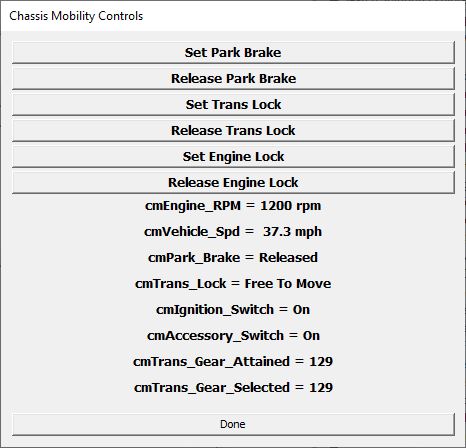
A full test should exercise every means by which a device changes state:
- RV-C commands. The control panel provides an easy interface for this. Each button sends a command to change a specific field.
- Integrated controls. e.g. the park brake switch in the dash, or the position of the ignition key.
- Changes in the environment. e.g. the location of the keyfob in a remote-ignition system.
- Internal changes. e.g. the shifting of the gears in an automatic transmission.
Make every attempt to "break" the DUT!!! This includes generating faults. Any fault that prevents the device from reporting a field accurately should generate an "Error" value in that field.
After exhausting all possibilities, press the Done button on the panel to end the test. RCT will then ask four questions:
- Did the Data Sniffer update promptly for all changes in device state?
- Did all Reported values match the Actual status?
- Were all Out-of-Range values reported correctly?
- Were all Error values reported correctly?
RCT can't see when you turn the ignition key or press the accelerator, so these answers must rely on human perception. The promptness and accuracy must be consistent with user expectations and the requirements of other devices that might rely on the data. In general, it should seem "instantaneous".
If you could not generate any Out-of-Range or Error values, select "Yes" for those questions.
RCT will log the results for CM-10 and all its associated field tests. If the DUT didn't provide data for any particular field, the corresponding test will be marked as Skipped , with reason: "No support detected".
CM-110 Chassis Mobility Status
This is another DGN Status Test Testing CM-110 also covers CM-120, CM-130, ..., CM-150.
CM-110 begins by monitoring the DGN for 15 seconds to determine whether it is being broadcast as specified. Next, a series of Request_for_DGN messages are sent to test whether the DUT responds promptly. While these tests are running, do not perform any operations which would force a change in the DUT's state.
In the next stage, every attempt must be made to force the DUT to produce every possible output. As much as is safely possible, the DUT should be forced into every possible state and range of values, including error states.
To aid in this, RCT provides a Data Sniffer, which parses ALL messages coming from the DUT.
A full test should exercise every means by which the device changes state and the data values can change.
- Integrated controls. e.g. the steeering wheel, the headlight switch in the dash.
- Changes in the environment. e.g. the amount of fuel in the tank.
- Internal changes. e.g. the accumulation of miles in the odometer.
Make every attempt to "break" the DUT!!! This includes generating faults. Any fault that prevents the device from reporting a field accurately should generate an "Error" value in that field.
After exhausting all possibilities, press the spacebar or select Test-Continue from the menu. RCT will then ask four questions:
- Did the Data Sniffer update promptly for all changes in device state?
- Did all Reported values match the Actual status?
- Were all Out-of-Range values reported correctly?
- Were all Error values reported correctly?
These answers must rely on human perception. The promptness and accuracy must be consistent with user expectations and the requirements of other devices that might rely on the data. In general, it should seem "instantaneous".
If you could not generate any Out-of-Range or Error values, select "Yes" for those questions.
RCT will log the results for CM-110 and all its associated field tests. If the DUT didn't provide data for any particular field, the corresponding test will be marked as Skipped , with reason: "No support detected".
CM-160, CM-180, CM-200 Chassis Mobility Command
These tests verify that the DUT supports the engagement and release of the Park Brake, Transmission Lock, and Engine Lock.
In each case, the test begins when the appropriate "lock" is disengaged. RCT then sends a command to engage the lock, waits 5 seconds, then sends another to disengage the lock. A panel displays the status, but the test is entirely automatic.
CM-170, CM-190, CM-210 Chassis Mobility Command Overrides
These tests verify that the Override flags in CHASSIS_MOBILITY_COMMAND are properly implemented. These flags apply to the release of the Park Brake, Transmission Lock, and Engine Lock.
The test requires that the DUT be put in a state in which it is not safe to release the particular lock. A typical example would be a Transmission Lock that remains engaged whenever a slide room or levelers are extended. In this case, the test should be run with a slide out or jacks down.
Once the spacebar is pressed, the test runs automatically.
Vehicle Environment
Due to it's unusual flexibility, the VEHICLE_ENVIRONMENT_STATUS DGN has two sets of status tests. Each field in the DGN can be implemented in one of two ways. The DUT might detect the condition itself, automatically, or it might allow other devices to directly tell it the status, acting as a passive "scorecard". Both might be true - with some fields being actively managed and others passively recorded.
CM-220 Part 1 Basic Reporting and Active Support
CM-220 covers the basics of DGN reporting and requests. It covers field tests CM-240, CM-260, ... , CM-440.
Like other DGN status tests, CM-220 monitors the DGN for 15 seconds and then sends several Requests_for_DGN. During this phase, do not operate the DUT in any way that changes the status of any field.
The second phase of the test requires that every attempt be made to force the DUT to produce every possible output. As much as is safely possible, the DUT should be forced into every possible state and range of values, including error states.
To aid in this, RCT provides a Data Sniffer, which parses ALL messages coming from the DUT.
A full test should exercise every means by which the device changes state and the data values can change.
- Integrated controls. e.g. any user switches.
- Changes in the environment. e.g. the ambient light or shore power availability.
- Internal changes. e.g. the data from any sensors.
Make every attempt to "break" the DUT!!! This includes generating faults. Any fault that prevents the device from reporting a field accurately should generate an "Error" value in that field. For this DGN, this likely would include taking other devices, such as the transfer switch or charger, off-line to prevent information such as the shore power voltage from being read on the RV-C bus.
After exhausting all possibilities, press the spacebar or select Test-Continue from the menu. RCT will then ask four questions:
- Did the Data Sniffer update promptly for all changes in device state?
- Did all Reported values match the Actual status?
- Were all Out-of-Range values reported correctly?
- Were all Error values reported correctly?
These answers must rely on human perception. The promptness and accuracy must be consistent with user expectations and the requirements of other devices that might rely on the data. In general, it should seem "instantaneous".
If you could not generate any Out-of-Range or Error values, select "Yes" for those questions.
RCT will log the results for CM-220 and all the associated field tests that imply active support. If the DUT didn't provide data for any particular field, the corresponding test will be marked as Skipped , with reason: "No support detected".
CM-220 Part 2 Passive Support
This test covers field tests CM-230, CM-250, ... , CM-430. It does not cover CM-220 itself, as it skips the initial broadcast and request tests.
The test runs automatically. It simply runs through the fields, sending VEHICLE_ENVIRONMENT_COMMAND DGNs with specific fields set to various values several times. RCT watches the device behavior and reports the results automatically.
RCT will log the results for all of the associated field tests that imply passive support. If the DUT didn't provide data for any particular field, the corresponding test will be marked as Skipped , with reason: "No support detected".